Making Tax Digital
Making Tax Digital for taxi and private hire operators
At a glance
Making Tax Digital for self employed taxi and PH drivers: HMRC auto-enrol from Sep 2026, £50k gross threshold, no quarterly penalty points in 2026/27, and an operator export checklist so drivers can record gross fares not just bank payouts.
Use the section links to find the rules, office actions and sources.
Making Tax Digital for Income Tax is now live for many self-employed taxi and private hire drivers. If a driver's qualifying income was over £50,000 in 2024/25, they should have been using Making Tax Digital from 6 April 2026. Qualifying income means gross turnover from self-employment and property before expenses — not profit. From September 2026, HMRC is auto-signing up sole traders and landlords who must use the service for 2026/27 but have not enrolled. Confirmation can arrive in the HMRC online account or by post. After sign-up, they must confirm income sources, get compatible software, and catch up digital records from 6 April 2026. Your operator office does not file their tax for them. You do control clean fare, commission and payout exports that drivers and accountants need. CabiSync helps you keep those office records tidy — it is not Making Tax Digital software, and drivers still need HMRC-compatible software for quarterly updates and the annual return.
Why this matters now
September 2026 is not a soft warning. HMRC has started signing people up in stages. Many self-employed drivers are in that group because fare turnover often clears £50,000 even when take-home pay looks lower after fuel, finance and commission.
Your drivers will ask for:
- Year-to-date job and fare totals from 6 April 2026
- Commission and fee breakdowns, not just bank payouts
- Cash vs card vs account splits they can import or re-key
If your office can only say "check your bank," they will understate gross income or guess. That creates HMRC disputes later — and Monday-morning queues at your counter.
This article is for the operator office: what the rules say, what auto-enrol means, how gross differs from net, and a practical export checklist. Confirm live GOV.UK guidance on the day you act. This is not tax advice.
The clear problem
Most offices already produce weekly driver statements. Fewer produce statements that answer Making Tax Digital.
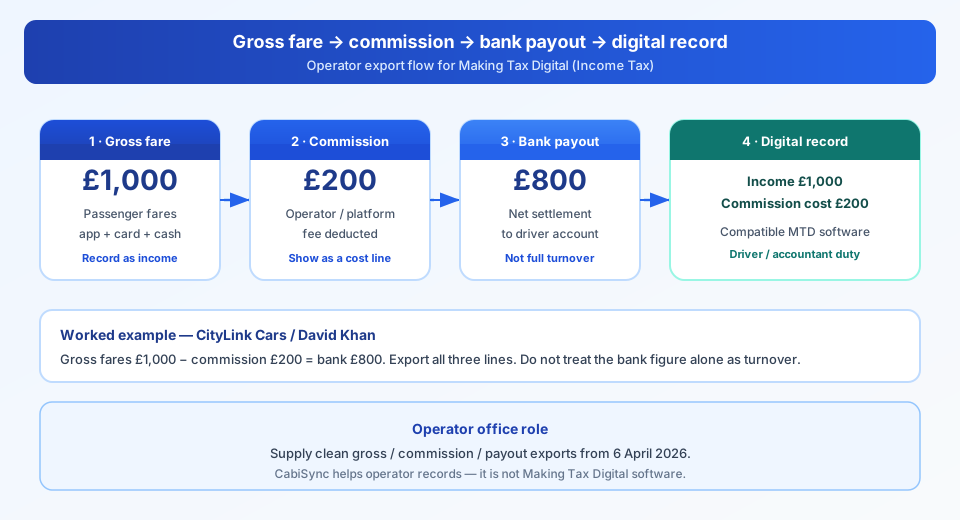
What the driver sees in the bank: £800 after commission.
What digital records often need to show: £1,000 of passenger fares, with £200 commission as a cost.
What HMRC auto-enrol triggers on: gross qualifying income over £50,000 in 2024/25 — not "what landed in the account."
When David Khan drives for CityLink Cars, passengers pay £1,000 in fares on app and card work in a week. CityLink takes £200 commission. David banks £800. If he only records £800 as turnover, his digital records miss £200 of income and may miss the matching expense. Multiply that across apps, cash ranks and account work, and quarterly totals drift.
Your job as operator is not to become their accountant. Your job is to give them reconciled exports they can trust.
Rules and requirements (with primary sources)
Treat this as a working map. Confirm the live GOV.UK pages before you brief drivers.
1) Who must use Making Tax Digital for Income Tax
Sole traders and landlords registered for Self Assessment must use Making Tax Digital for Income Tax when their qualifying income is over the relevant threshold. Qualifying income is total income from self-employment and property before expenses (turnover).
Threshold staging (GOV.UK):
| Qualifying income over… | In tax year… | Must use MTD from… |
|---|---|---|
| £50,000 | 2024/25 | 6 April 2026 |
| £30,000 | 2025/26 | 6 April 2027 |
| £20,000 | 2026/27 | 6 April 2028 |
Sources:
- Find out if and when you need to use Making Tax Digital for Income Tax
- Sign up for Making Tax Digital for Income Tax — defines qualifying income as amount before expenses
2) What they must do once in scope
Compatible software must:
- Create and store digital records of self-employment (and property) income and expenses
- Send quarterly updates — summaries of income and expense totals, not a full tax return each quarter
- Submit the tax return (and add other income sources) through that route
- Still pay the full tax bill by 31 January after the tax year ends
Source: Check what to do if HMRC has signed you up and Use Making Tax Digital for Income Tax.
3) HMRC auto-sign-up from September 2026
GOV.UK guidance (last updated 11 September 2026) confirms:
- From September 2026 onwards, if someone needs Making Tax Digital for 2026/27 and has not signed up, HMRC will sign them up in stages
- HMRC does this where records show qualifying income over £50,000 in 2024/25
- Confirmation may arrive in the HMRC online account or by post
After HMRC has signed them up, they must:
- Access HMRC online services and open Making Tax Digital for Income Tax
- Check and confirm income sources (HMRC uses the 2024/25 return, and also checks a submitted 2025/26 return if it was filed before sign-up)
- Get software that works with Making Tax Digital for Income Tax (HMRC does not supply bookkeeping software; use the find-software tool)
- Catch up digital records from the start of the tax year (6 April 2026) and send overdue quarterly updates as soon as possible
TaxiPoint reports that taxi and PHV drivers are among those affected because many operate as sole traders — not because HMRC targeted the trade as a separate list.
Sources:
- Check what to do if HMRC has signed you up for Making Tax Digital for Income Tax (updated 11 Sep 2026)
- TaxiPoint: HMRC begins automatically signing up taxi and PHV drivers
4) Penalties in 2026/27 — stick to GOV.UK
For the 2026/27 tax year, HMRC will not apply penalty points for missing a quarterly update deadline. Drivers still need to keep digital records and send the final quarterly update before they can submit the tax return. Penalty points still apply for missing the tax return deadline. Late payment rules also still apply.
Do not invent "quarterly fine" figures for 2026/27. Point drivers to GOV.UK.
Sources: same auto-sign-up guidance and Sign up for Making Tax Digital for Income Tax (penalties section).
5) Gross fares vs net payouts
Trade coverage and tax software commentary are clear on the operator risk: recording only bank deposits can confuse gross passenger fares with net payouts after commission.
Simplified pattern (same shape as TaxiPoint's £1,000 / £800 example), using CityLink Cars and David Khan:
| Line | Amount |
|---|---|
| Passenger fares attributable to David Khan | £1,000 |
| CityLink Cars / platform commission | £200 |
| Amount banked | £800 |
Digital records usually need income and the related commission cost shown properly — not "£800 and hope." Multi-app, cash and card work needs reconciled statements. Platforms and operators do not complete the driver's Making Tax Digital duties for them.
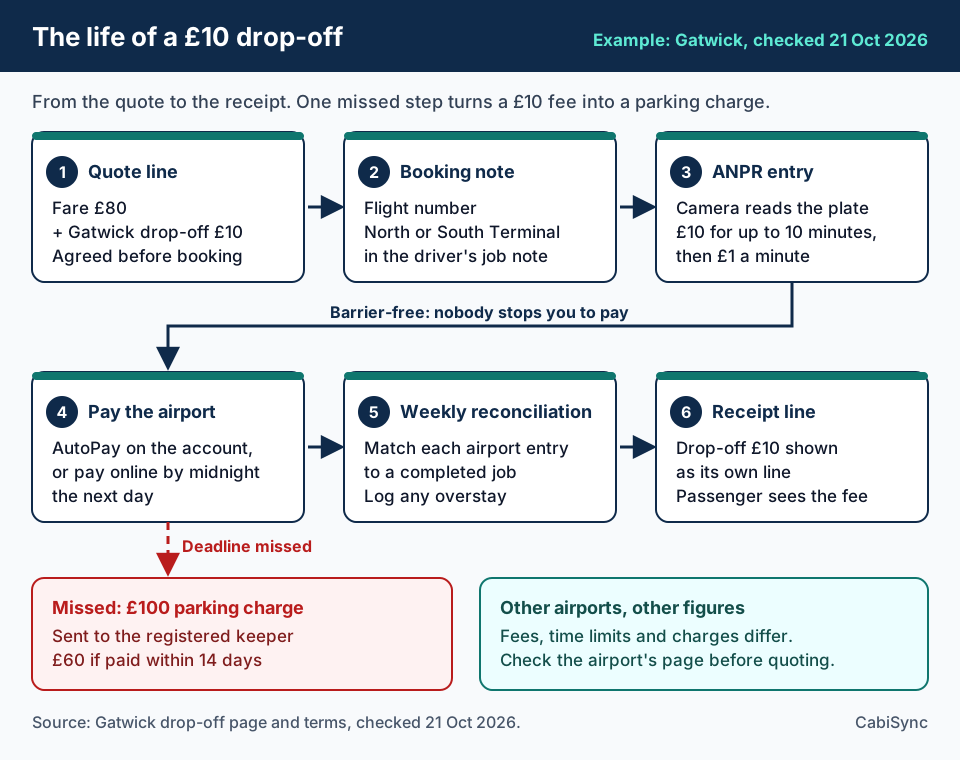
The same goes for costs drivers pay on the job, such as airport drop-off charges. Show them as separate lines on weekly statements so drivers can record them. Our airport drop off charges guide covers reimbursing drivers at cost.
Sources:
Step-by-step: what your operator office should do this week
Step 1 — Brief drivers who may already be mandated
Ask who had self-employment (and property) turnover over £50,000 in 2024/25, or who has an HMRC auto-enrol letter. Point them to GOV.UK — do not guess their tax position for them.
Step 2 — Confirm what you can export from 6 April 2026
For each active driver, check you can produce:
- Gross fare / job value totals by period
- Commission, radio, card and other fee lines
- Net payout / settlement amounts
- Cash vs card vs account (or app) split
If you cannot, fix the export before the next driver queue forms.
Step 3 — Publish one office rule for statements
Example rule used by QuickRide Taxis: every weekly statement shows gross fares, each deduction line, and net paid. No "net only" sheets from Monday onwards.
Step 4 — Give drivers a clean file they can hand to software or an accountant
CSV or PDF is fine. Include the period dates, driver name, and totals that reconcile. Drivers (or their agents) still enter or import those figures into HMRC-compatible Making Tax Digital software.
Step 5 — Keep dispatch separate from tax software
Your radio room and booking system stay. Making Tax Digital is the driver's Self Assessment rhythm. Operator records feed that rhythm; they do not replace compatible software.
Operator export checklist (tick before you hand drivers a file)
Use this as a Monday briefing sheet.
| Check | Done? |
|---|---|
| Period dates clear (from / to), including catch-up from 6 April 2026 if needed | ☐ |
| Driver name and any internal ID match the settlement they expect | ☐ |
| Gross passenger / job fare total shown (not bank-only) | ☐ |
| Commission / booking fee line shown separately | ☐ |
| Card / payment processing fees shown if you deduct them | ☐ |
| Radio / dispatch / other office charges shown if deducted | ☐ |
| Net amount paid or owed reconciles: gross − deductions = net | ☐ |
| Cash collected vs card / account / app work split | ☐ |
| Multi-app or multi-channel work not collapsed into one unexplained bank line | ☐ |
| File format agreed with driver or accountant (PDF statement + CSV preferred) | ☐ |
| You have not told drivers that your office software "is" Making Tax Digital for Income Tax | ☐ |
CityLink Cars now attaches this checklist to every bulk export email. Drivers stop asking "is the £800 the turnover?" because the sheet shows £1,000 gross and £200 commission.
Common mistakes
- Treating bank deposits as full turnover — Misses commission already taken off before payout.
- Ignoring cash jobs — Cash that never hits the bank still counts as income.
- Assuming the app completes Making Tax Digital — Statements help; the driver's digital records and quarterly updates remain their duty.
- Mixing mileage allowance with actual vehicle costs — Drivers can use one method, not both (trade Q&A flag).
- Office saying "we're MTD software" — Unless you are listed as compatible Making Tax Digital for Income Tax software and actually submit for the taxpayer, do not claim it. Feed clean records instead.
- Waiting for a perfect January rebuild — Auto-enrol expects catch-up from 6 April 2026, not from the letter date.
- Inventing quarterly penalty points for 2026/27 — GOV.UK says no quarterly penalty points that year; the annual return deadline still carries penalties.
- Using profit to test the £50k threshold — It is gross qualifying income.
Related ops (keep money and licensing joined up)
Making Tax Digital sits next to other money and licensing jobs in the same office:
- VAT on taxi and private hire (agent vs principal, add-backs, weekly statements): VAT on taxi fares for UK PHV operators: TOMS closed. VAT on full fare vs commission still turns on agent vs principal — see the refreshed TOMS / full-fare guide.
- HMRC tax check codes for licence renewals (120-day codes your office must track): Tax Check Code for Taxi Driver Renewals: The Operator Office Guide
FAQs
Is the £50,000 threshold profit or turnover?
Turnover / gross qualifying income from self-employment and property before expenses. Confirm on GOV.UK's sign-up and "find out if and when" pages.
Will HMRC auto-enrol every taxi driver?
No. HMRC signs up people who must use Making Tax Digital for 2026/27 and have not enrolled, where records show qualifying income over £50,000 in 2024/25. Many drivers sit in that group; it is not a taxi-only list.
Are there quarterly penalty points in 2026/27?
GOV.UK says you will not get penalty points for missing a quarterly update deadline for 2026/27. You still need digital records and the final quarterly update before the tax return. The tax return deadline still carries penalties.
Does my operator software replace Making Tax Digital software?
No. Drivers (or agents) need software that works with Making Tax Digital for Income Tax. Your office should supply clean exports. CabiSync is built for operator records and compliance workflows — not as a claim of HMRC Making Tax Digital compatibility.
What if a driver only works cash ranks plus one app?
They still need one place that consolidates all channels. Your export should not hide cash or collapse everything into a single bank figure.
What if HMRC signed someone up who stopped trading before 6 April 2026?
GOV.UK tells them to update income information in the HMRC online account. They may not need to use Making Tax Digital, but they still need to deal with the 2025/26 return rules set out on that page. Point them to the official steps — do not advise from memory.
What if a driver is digitally excluded?
Some people can apply for an exemption from Making Tax Digital for Income Tax if they are digitally excluded — for example age, health, disability, remote location, or religious beliefs that make digital records unreasonable. HMRC decides case by case. Your office should not decide this for them. Point them (or their agent) to GOV.UK: Find out if you can get an exemption and Apply for an exemption.
What to do next
- Pin the gross → commission → bank → digital record figure above in the office.
- Run one sample export for a busy driver from 6 April 2026 to today.
- Tick the export checklist before you email the file.
- Send drivers the GOV.UK auto-sign-up page — not a WhatsApp rumour.
- Diary the £30,000 (April 2027) and £20,000 (April 2028) threshold drops so the next cohort is not a surprise.
- Keep VAT statement work and tax-check-code chasing on the same compliance rhythm.
Soft CTA
If you want a second pair of eyes on whether your weekly statements and exports would survive a driver Making Tax Digital catch-up, book a free 15-minute compliance review with CabiSync. We look at fare totals, commission lines and payout reconciliations. Your dispatch stays. No rip-and-replace pitch.
CabiSync’s published guide prices are Starter £29 and Professional £42 per active driver per week, for fleets with up to 20 active drivers. Confirm plan scope and availability during a demo. See the pricing guide.
Quarterly updates vs year-end vehicle relief
Quarterly Making Tax Digital updates hold income and expense totals. Capital allowances on vehicles are a year-end adjustment made when the driver finalises the tax return, so drivers do not need to recalculate vehicle relief every three months. TaxNav, a commercial tax software firm, confirmed this timing in TaxiPoint on 5 October 2026. For the full breakdown of 2026/27 capital allowances rates and mileage options, see our capital allowances guide.
Sources
- GOV.UK — Check what to do if HMRC has signed you up for Making Tax Digital for Income Tax (updated 11 September 2026)
- GOV.UK — Find out if and when you need to use Making Tax Digital for Income Tax
- GOV.UK — Sign up for Making Tax Digital for Income Tax
- GOV.UK — Use Making Tax Digital for Income Tax
- TaxiPoint — HMRC begins automatically signing up taxi and PHV drivers for Making Tax Digital (13 September 2026)
- TaxiPoint — £1,000 in fares but only £800 paid out (12 September 2026)
- TaxiPoint — Q&A with TaxNav: Making Tax Digital for taxi and PHV drivers
- GOV.UK — Find out if you can get an exemption from Making Tax Digital for Income Tax
- GOV.UK — Apply for an exemption from Making Tax Digital for Income Tax
Related guides
- Tax check code for taxi and private hire operators — renewals and HMRC
- Private hire operator licence: hard stops after 205 jobs on an expired badge — document calendars and compliance
- VAT on taxi: the complete guide for UK private hire operators
This article is practical operator guidance based on publicly available GOV.UK materials and trade reporting. It is not tax or legal advice. Confirm live HMRC guidance before you change office process or advise drivers.
Last reviewed: 2026-09-22
Byline: CabiSync Editorial Team